Custom Mobile App Development: From Idea to App Store
Your app sits in a pocket, next to family photos and bank cards. That is a rare amount of trust. Custom mobile app development earns it by shaping the product around your customers rather than around a template. Off-the-shelf builders suit simple needs, and they are cheap to start. However, they cap you quickly.
You cannot change the data model, you cannot add the integration your operations team needs, and you cannot fix a slow screen. This guide walks through the full custom mobile app development process. In addition, it covers realistic timelines, the factors that move cost, and the mistakes that quietly derail first projects.
What Custom Mobile App Development Actually Involves
Custom mobile app development means building an application from your own requirements, on your own data
model, for iOS and Android. You own the code. You also own the roadmap.
A finished app is rarely one thing. Instead, it is usually three: the app itself, a backend that stores and serves
data, and an admin layer your team uses to run it. Scoping only the first part is the most common estimating
error we see.
Native builds use Swift for iOS and Kotlin for Android. Cross-platform builds share one codebase across both.
Either route counts as custom work, because the decisions still start with your users.
Why Businesses Choose Custom Over Template Apps
Templates win on day one. Custom builds win on year two. Here is why teams make the switch.
You own the data: your records live in your database, so exports, reporting and migrations stay under your
control.
Integrations actually work: custom code talks to your CRM, your stock system or your payment provider
directly.
Performance is tunable: when a screen loads slowly, your team can profile it and fix it.
The roadmap is yours: you ship what your customers ask for, rather than waiting for a vendor to add it.
That said, custom is not automatically the right answer. If your idea is still rough, validate it cheaply first. A short
pilot beats a long build every time.
The Custom Mobile App Development Process, Step by Step
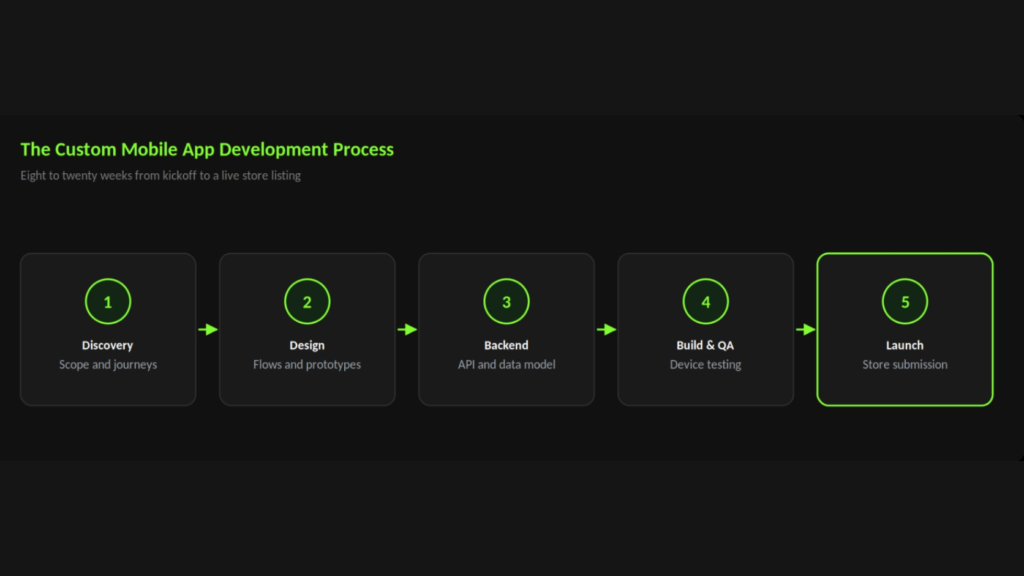
Good projects follow a predictable shape. Below is the sequence we use at Web Matrix Lab.
Step 1: Discovery and Scoping
First, agree what the app is for. Write the primary user journey as a single sentence. Then list the features that
journey needs, and park everything else in a later phase.
Step 2: UX Flows and Interface Design
Next, map the screens and the moves between them. Clickable prototypes are cheap to change, whereas built
screens are not. Therefore settle the flow before anyone writes production code.
Step 3: Backend and API Build
Meanwhile, the backend takes shape. Design the API contract early, because the app team and the server team
both depend on it. Clear contracts also let the two tracks run in parallel.
Step 4: App Build and Quality Assurance
Then the app comes together in fortnightly slices. Test each slice on real devices, not only on simulators. Older
Android handsets in particular surface issues that a modern emulator hides
Step 5: Store Submission and Launch
Finally, prepare the store listings, the privacy details and the release builds. Apple reviews most submissions
within a day or two, although a rejection resets the clock. Build a buffer into the launch date for exactly that
reason.
How Long Custom Mobile App Development Takes
Most first releases land somewhere between eight and twenty weeks. Scope drives the range far more than
technology does

Two things stretch a timeline more than anything else. The first is a feature list that keeps growing during the
build. The second is slow feedback, because a prototype waiting three weeks for sign-off is three weeks of lost
momentum.
What Really Drives Custom Mobile App Development Cost
Cost tracks effort, and effort tracks complexity. These five factors move the number most.
Screen count and logic depth: twelve simple screens cost far less than six screens with complex rules behind
them.
Integrations: every external system adds build time, testing time and ongoing maintenance.
Offline support: apps that work without a signal need sync and conflict handling, which is genuinely hard.
Compliance: health, finance and government work brings audits, documentation and stricter data handling.
Design ambition: custom animation and bespoke components look excellent, yet they take real hours to
build well.
Ask any quote to separate build, launch and first-year support. Otherwise you compare numbers that cover
different things
Mistakes That Derail First App Projects
Skipping discovery: teams that start coding in week one usually rebuild half of it in week ten.
Ignoring the admin side: somebody has to manage content, users and refunds, so plan those tools in.
Testing on one device: your phone is not representative, and fragmentation is real on Android.
No analytics at launch: without events you cannot see where users stall, so you end up guessing.
Treating launch as the finish: the first month after release generates the most valuable feedback you will
ever get. Scoping tip: Split your feature list into three columns: needed for launch, needed for growth, and nice to
have. Then build only the first column. This single exercise shortens most custom mobile app development
projects by weeks.
Choosing a Development Partner
The partner you pick shapes the result as much as the brief does. Ask a few direct questions early.
- Can they show live apps? Ask for store links, then use the apps yourself for ten minutes.
- Who does the work? Find out whether the team you meet is the team that builds it.
- How do they handle change? Scope shifts on every project, so ask how they price it.
- What happens after launch? A good partner talks about month three, not just launch day.
Ask for a written scope too. A clear document lists screens, integrations and assumptions. It also saves both sides
a great deal of argument later.
Preparing for the App Stores
Store submission trips up plenty of first-time teams. Fortunately, the rules are public and the work is easy to
plan.
You need store accounts in your own company name. You also need a privacy policy, a support contact and
screenshots for several device sizes. Apple asks what data you collect, and the answer must match what your app
actually does.
Set up both accounts in week one. Verification can take days, and nobody wants that delay on launch week.
How Web Matrix Lab Approaches Custom Mobile App Development
Strong apps need three skills at once: product thinking, clean engineering and interface design. Two out of three
shows in the finished product.Our custom iOS and Android app development service covers the whole path, from discovery through to store submission and post-launch support. We build on your data, in your accounts, with code you own.
Next in this series: cross-platform app development if you are still choosing a stack, or mobile app UI UX design if the interface is your priority. Planning an app build?
Book a free consultation with our team and we will scope it with you.
Questions & Answers
Should I build for iOS or Android first?
Follow your audience. New Zealand and Australian consumer apps often lean iOS, whereas many global and
enterprise audiences lean Android. Cross-platform frameworks remove much of this dilemma, since one build
covers both.
Do I need a backend for my app?
Almost always, yes. Any app with accounts, shared data or content updates needs a server behind it. Only fully
offline tools, such as a simple calculator, avoid one.
Who owns the code at the end of the project?
You should. Agree ownership in writing before work starts, and make sure the repository, the store accounts and
the cloud accounts sit in your name. This matters enormously if you ever change development partner.