Cross-Platform App Development: Flutter, React Native or Native?
Building the same app twice is expensive. You pay for two codebases, two teams and two sets of bugs. Cross platform app development removes most of that duplication, because one codebase ships to both stores.
The approach has matured a great deal. Modern frameworks now render close to native speed, and they reach
the device features most products actually need. Even so, native still wins in a handful of cases.
This guide compares the main options honestly. It covers performance, cost, hiring and the situations where
cross-platform app development is the wrong call.
How Cross-Platform App Development Works
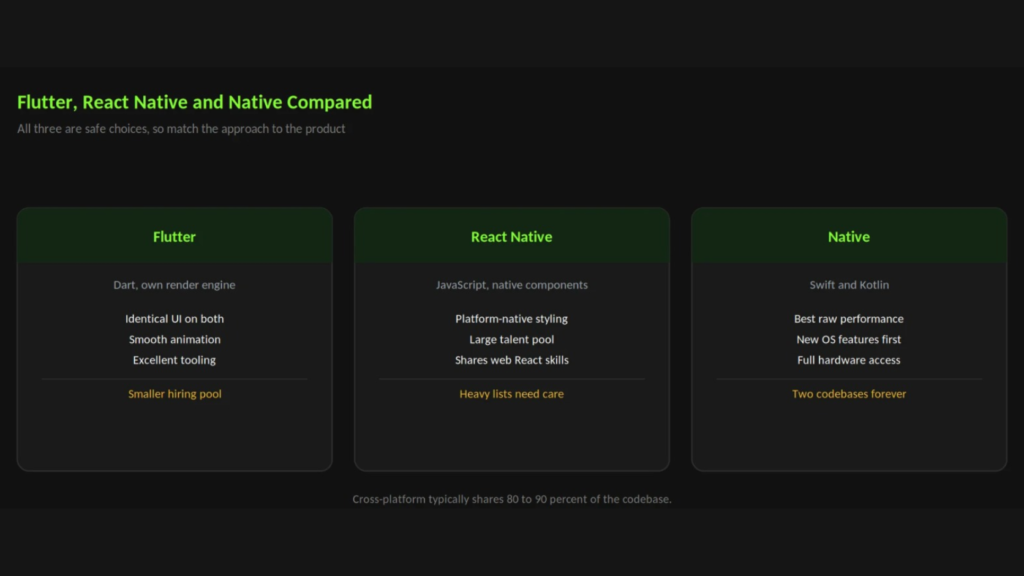
You write your screens, logic and data handling once. The framework then compiles or renders that code on both
iOS and Android.
Anything genuinely platform specific still drops down to native code. Push notifications, biometrics and camera
access all work this way. As a result, you share roughly eighty to ninety percent of the codebase rather than all of
it That shared layer is where the savings come from. One bug fix lands on both platforms at once, and one feature
ships to every user in a single release.
Flutter, React Native and Native Compared
Flutter
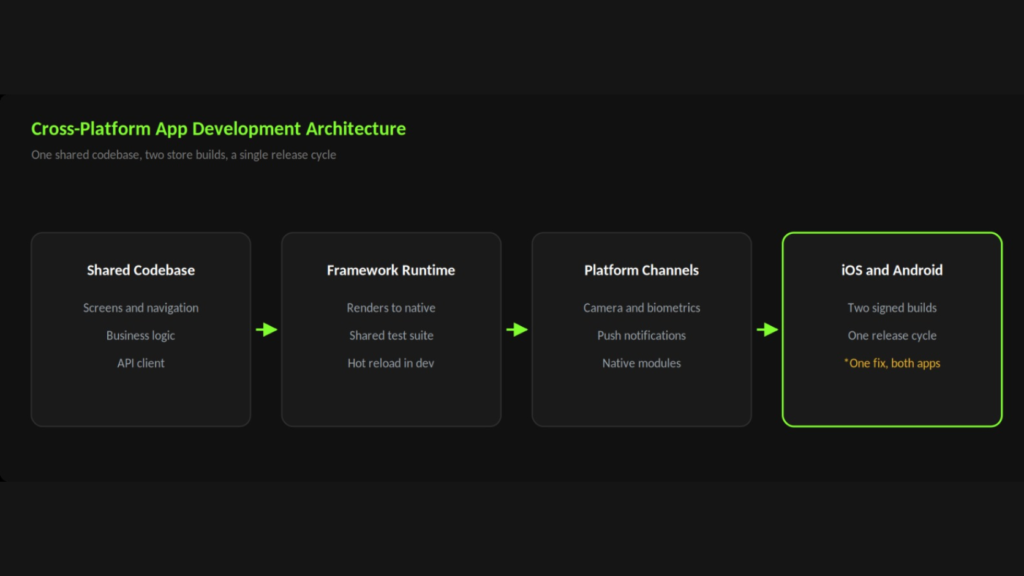
Flutter draws every pixel itself using its own rendering engine. Consequently, screens look identical on both
platforms, and animation stays smooth. The
Flutter documentation is unusually good, which helps new teams get
moving.
The trade-off is Dart. It is a pleasant language, yet fewer developers know it than know JavaScript. In smaller
markets that affects hiring.
React Native
React Native uses JavaScript and real native components. Therefore your app inherits each platform’s own look
automatically. Teams with web React experience also move across quickly, which shortens ramp-up.
Heavy animation and complex lists need more care here.
The React Native docs cover the newer architecture that addresses much of this. Native Swift and Kotlin Native remains the benchmark for raw performance and for day-one access to new OS features. Games, augmented reality and heavy background processing all belong here.
However, you carry two codebases forever. That doubles maintenance, and it doubles the surface area for bugs.
When Cross-Platform App Development Is the Right Choice
Your app is mostly screens and data: bookings, dashboards, marketplaces and internal tools all fit
comfortably.
You need both platforms at launch: one team reaching both stores beats two teams shipping sequentially.
Your budget is fixed: shared code typically cuts build cost by a third against two native apps.
Your team is small: fewer specialists means less coordination and faster releases.
When You Should Still Build Native performance is the product: games, video editing and real-time graphics need every frame.
You depend on brand-new OS features: native gets them first, whereas frameworks follow later.
Deep hardware access matters: Bluetooth peripherals, sensors and background location get fiddly through a
bridge.
You already have a strong native team: rewriting a healthy app to save on future maintenance rarely pays
off.
Decision tip: Write down the three hardest things your app must do. If none of them involves frame-by
frame performance or unusual hardware, cross-platform app development will almost certainly serve you
well.
What Cross-Platform App Development Really Costs
Shared code lowers the build cost, and it lowers the ongoing cost even further. One release process, one test
suite and one dependency upgrade cycle all add up over years.
Do budget for platform work, though. Store submissions differ, permissions differ, and each OS update brings its
own surprises. Cross-platform app development reduces that work substantially, but it does not remove it.
What You Share, and What You Still Build Twice Shared does not mean identical. Some work always stays platform specific, so plan for it.
Shared: screens, navigation, business rules, API calls and most of your tests. Mostly shared: styling, though small spacing tweaks per platform are normal.
Platform specific: push setup, permissions, deep links and store metadata.
Native by nature: widgets, watch apps and anything that runs outside your app.
In practice this splits neatly. The bulk of your effort goes into shared code. A thin slice on each side handles the
rest.
A Realistic Timeline for a Cross-Platform Build
One team, one codebase and two stores. That is the shape of most projects here.
Design usually runs two to four weeks. The build then takes eight to fourteen weeks for a typical product. Testing
overlaps the build rather than following it, since you test on both platforms as you go.
Web Matrix Lab | Mobile App Development Article Set | Page 9 of 23
Submission adds a week at the end. Google reviews quickly, whereas Apple sometimes asks questions. Therefore
leave a buffer before any launch date you announce.
Testing Across Two Platforms
One codebase does not mean one test pass. You still ship to two very different sets of devices
Test on real hardware: simulators miss keyboard quirks, memory limits and camera behaviour.
Cover old and new: include the oldest OS version you support, since that is where failures hide.
Check the small screens: cramped layouts break first on compact phones.
Automate the core journey: one scripted path through signup and the main task catches most regressions.
Above all, keep a short device matrix. Four or five handsets cover the bulk of real users, and a focused list beats a
long one nobody works through.
How Web Matrix Lab Delivers Cross-Platform App Development
Framework choice should follow the product, never fashion. We start with your feature list, your budget and
your team, then recommend the stack that fits.
Our
cross-platform app development service covers architecture, build, testing and release for both stores. It sits
alongside our native iOS and Android work, so the recommendation stays honest either way.
Related reading:
custom mobile app development for the full delivery process, and
mobile app maintenance for
what follows launch.
Not sure which stack fits your product?
Book a free consultation and we will talk it through
Questions & Answers
Do users notice the difference?
Rarely, for typical business and consumer apps. Users notice slow screens, awkward navigation and crashes
instead. A well-built cross-platform app beats a rushed native one on every measure that matters to them
Can I add native code later if I need it?
Yes. Both Flutter and React Native let you write native modules and call them from shared code. Teams
commonly do this for payments, mapping and hardware integrations
Which framework should I pick in 2026?
Choose Flutter when a consistent custom interface matters most. Choose React Native when your team already
writes JavaScript or when you want platform-native styling. Both are safe, well-supported choices