Containerisation and Orchestration: Docker and Kubernetes in Practice

The phrase it works on my machine has cost the industry an extraordinary amount of time. Containerisation and orchestration exist to end that argument, because the container carries its own environment everywhere it runs.
Containers package your application with its dependencies. Orchestration then runs those containers reliably across a fleet of machines, and it restarts them when they fail.
This guide explains how the two fit together. It also covers the point at which a team genuinely needs orchestration, since many teams adopt it far too early.
How Containerisation and Orchestration Fit Together
A container image is a sealed package. It holds your code, your runtime and your libraries at fixed versions. Therefore the same image behaves identically on a laptop, in staging and in production.
Orchestration handles everything above one machine. It schedules containers, scales them, replaces unhealthy ones and routes traffic to those that are ready. Kubernetes has become the common language for this work, though simpler managed services cover many needs.
What Containers Actually Give You
- Consistency: the same artifact runs in every environment, so a whole class of bugs simply disappears.
- Density: containers share the host kernel, so you fit more workloads on the same hardware.
- Fast starts: they launch in seconds, so autoscaling reacts quickly.
- Portability: an image runs on any provider, so your options stay open.
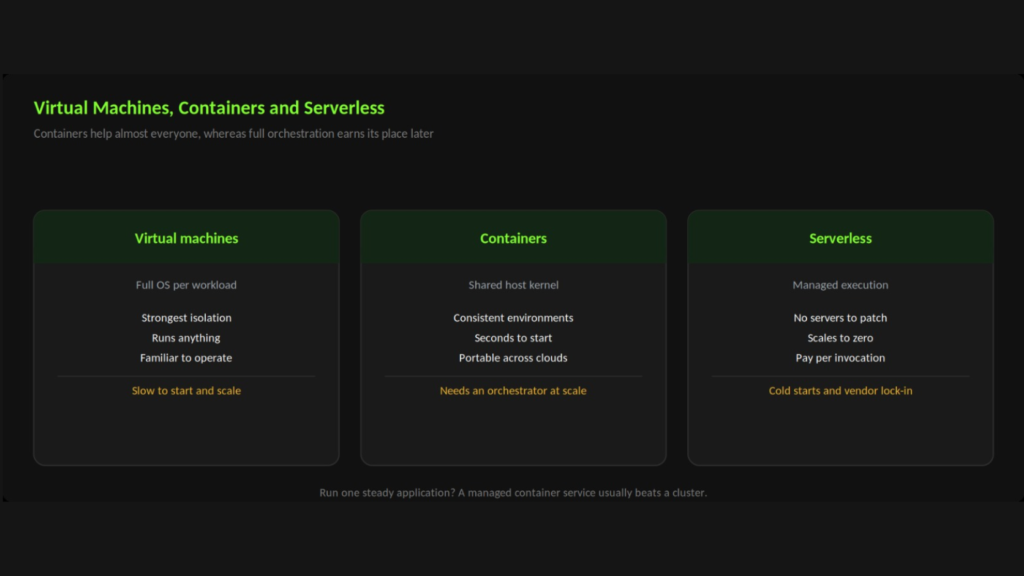
Run one steady application? A managed container service usually beats a cluster.
When Your Team Needs Orchestration
Containers help almost everyone. Full orchestration, on the other hand, earns its complexity only at certain points.
- Several services in production: once you run more than a handful, manual placement stops scaling.
- Variable load: autoscaling pays for itself, particularly when traffic swings sharply through the day.
- High availability requirements: self-healing and rolling updates matter especially when downtime is costly.
- Multiple teams shipping independently: shared platforms therefore give each team a safe lane.
If you run one application with steady traffic, a managed container service is usually the better answer. It gives you most of the benefit without a cluster to look after.
Adoption tip: Containerise first and orchestrate later. Teams that adopt Kubernetes before they have containerised anything spend their first month learning tooling rather than shipping features.
Building Images That Behave
Keep Images Small
Start from a slim base image, and use multi-stage builds so build tools never reach production. Smaller images pull faster, and they expose less surface to attackers.Never Bake in Secrets
Configuration belongs outside the image. Inject environment variables and mounted secrets at run time instead, because anything baked into a layer stays there permanently.Pin Your Versions
Avoid loose tags such as latest. Pin explicit versions, so a rebuild six months from now produces the same result as it does today.Add Health Checks
Orchestrators need to know when a container is alive and when it is ready for traffic. Without those probes, the platform cannot heal anything reliably.Common Mistakes With Containerisation and Orchestration
- No resource limits: without them, one greedy container starves its neighbours on the same node.
- Storing state in containers: containers vanish, so data belongs in managed databases and volumes.
- Running as root: unnecessary privileges turn a small vulnerability into a large one, so drop them.
- Adopting too early: a cluster you cannot operate is, in practice, riskier than the servers it replaced.
Where Your Data Lives
Containers come and go. Your data must not.
Keep state outside the container. Use a managed database for records, object storage for files and a managed cache for sessions. The container then holds nothing you would miss if it vanished.
This rule makes scaling simple. Any node can run any copy of the app, because none of them holds anything unique.
Cost and Team Impact
The technology is only half the decision. Someone has to run it every day.
- Cluster overhead: a managed control plane carries a monthly fee before you run anything.
- Idle capacity: nodes sized for peak traffic cost money at quiet times, so autoscale them.
- Learning curve: therefore budget real time for the team to get comfortable.
- On-call load: more moving parts means more things can page someone at night, so plan the rotation.
Weigh that against the gains. Faster releases, self-healing workloads and easier scaling are worth a lot once you have several services.
A Sensible Adoption Path
Move in small steps. Each one delivers value on its own.
- Step one: first, containerise a single service and run it locally.
- Step two: then build that image in your pipeline and push it to a registry.
- Step three: next, deploy it to a managed container service, with no cluster to run.
- Step four: add orchestration once you have several services and real scaling needs.
Many teams stop happily at step three. That is a good outcome, not a failure.
A Short Glossary
The words in this field trip people up. Here they are in plain terms.
- Image: a sealed copy of your app, along with everything it needs to run.
- Container: simply a running copy of that image.
- Registry: the store where images live, rather like a package repository.
- Pod: one or more containers that typically run together as a unit.
- Node: a machine that runs pods, usually one of many.
- Cluster: a group of nodes, so you manage them all as one.
Keep this list handy in early meetings. Shared words save a lot of time.
How Web Matrix Lab Approaches Containerisation and Orchestration
We match the platform to the team. Sometimes that means a full cluster, and often it means something much simpler that your engineers can operate confidently.
Our containerisation and orchestration service covers image design, cluster setup, autoscaling and deployment automation. As a result, releases become routine rather than eventful.
Related reading: CI/CD pipeline setup and cloud migration strategy.
Ready to modernise your deployments? Book a free consultation with our infrastructure team.
Questions & Answers
Do containers replace virtual machines?
Not entirely. Containers usually run on virtual machines, and they share that host kernel. Workloads needing strict isolation or their own kernel still belong on a VM
Is Kubernetes overkill for a small application?
Frequently, yes. A managed container service handles single applications with far less operational load. Move to Kubernetes when the number of services justifies it.
Can we containerise a legacy application?
Often, yes, particularly if it already runs on Linux. Applications that write to local disk or rely on fixed hostnames need adjustment first, though that work is usually modest.